AI Concierge Workstation Hotel and Visitor Desks in Abu Dhabi
How we built the tool concierge staff use at the desk: ask in plain words, show the guest real venues with ratings and hours, build the plan together and send it home on the guest's phone
Published · Updated

Client
Concierge Abu Dhabi
Headquarters
Abu Dhabi, United Arab Emirates
Timeline
Since November 2025
Technology
AI CONCIERGE
Itinerary hand-off by QR code, guest email or printout
Group profiles down to age bands, from infants to elderly guests and pets
Staff can hand-pick specific venues the plan must include
6
starter prompts the client's admins edit without a release
The challenge
Concierge and front-desk staff answer the same visitor questions all day and plan trips from memory, browser tabs and printed maps, with no consistent way to give the guest a plan they can take with them
The solution
A sign-in-only Next.js workstation with streaming AI answers over the emirate's official listings, venue cards with live hours and ratings, a guided itinerary builder, drag-and-drop editing and a QR, email and print hand-off, run from an admin console
The results
- Itinerary hand-off by QR code, guest email or printout
- Group profiles down to age bands, from infants to elderly guests and pets
- Staff can hand-pick specific venues the plan must include
- 6 starter prompts the client's admins edit without a release
- 65 named analytics events across chat, itineraries and sharing
- Phase 1 live in February 2026, Phase 2 in April 2026
The Concierge Desk, With the Whole Emirate Behind It
Concierge Abu Dhabi is an AI concierge for hotels and visitor desks, a web workstation for the people visitors talk to first: hotel concierges, front-desk teams and staff at visitor welcome points such as airports. A guest walks up and asks what to do with two children this afternoon, or how to spend a weekend as a couple. The staff member types the request, and the concierge answers with real venues, opening hours, ratings and a plan the guest can take away. EdgeFirm designed and built the web application and its admin console.
The desk is a different job from a chatbot on a website. The person typing is a professional serving someone standing in front of them, so speed and clarity matter more than conversation. Staff need to capture a guest's party and dates in a few taps, add the one restaurant or spa the guest already has in mind, show photos and hours on screen, and then get the plan onto the guest's phone before they walk away.
It is also a staff tool for an organization, not a public page. Every user signs in, each employee belongs to an organization and a role, and an admin team decides what the concierge suggests first, reviews feedback and watches usage and cost. Sessions had to be safe on shared desk computers, and every action a concierge takes had to be measurable.
8 capabilities carried the build
Design and build the Concierge Abu Dhabi web application end to end: the staff workstation, the guided itinerary builder, the guest hand-off, the public itinerary page the QR code opens, and the admin console that runs it.
01
Staff chat workstation
Streaming answers with a stop button, copy, share and thumbs up or down on every reply, AI follow-up suggestions, a searchable history with rename and delete, and a per-conversation message cap so long desk sessions start fresh.
02
Guest brief in a few taps
A search bar for group, dates and activities, with group profiles down to age bands, flexible or exact dates on a calendar that blocks past days, interests, events and accessibility needs covering motor, cognitive, visual, hearing and speech.
03
Venue cards and detail panel
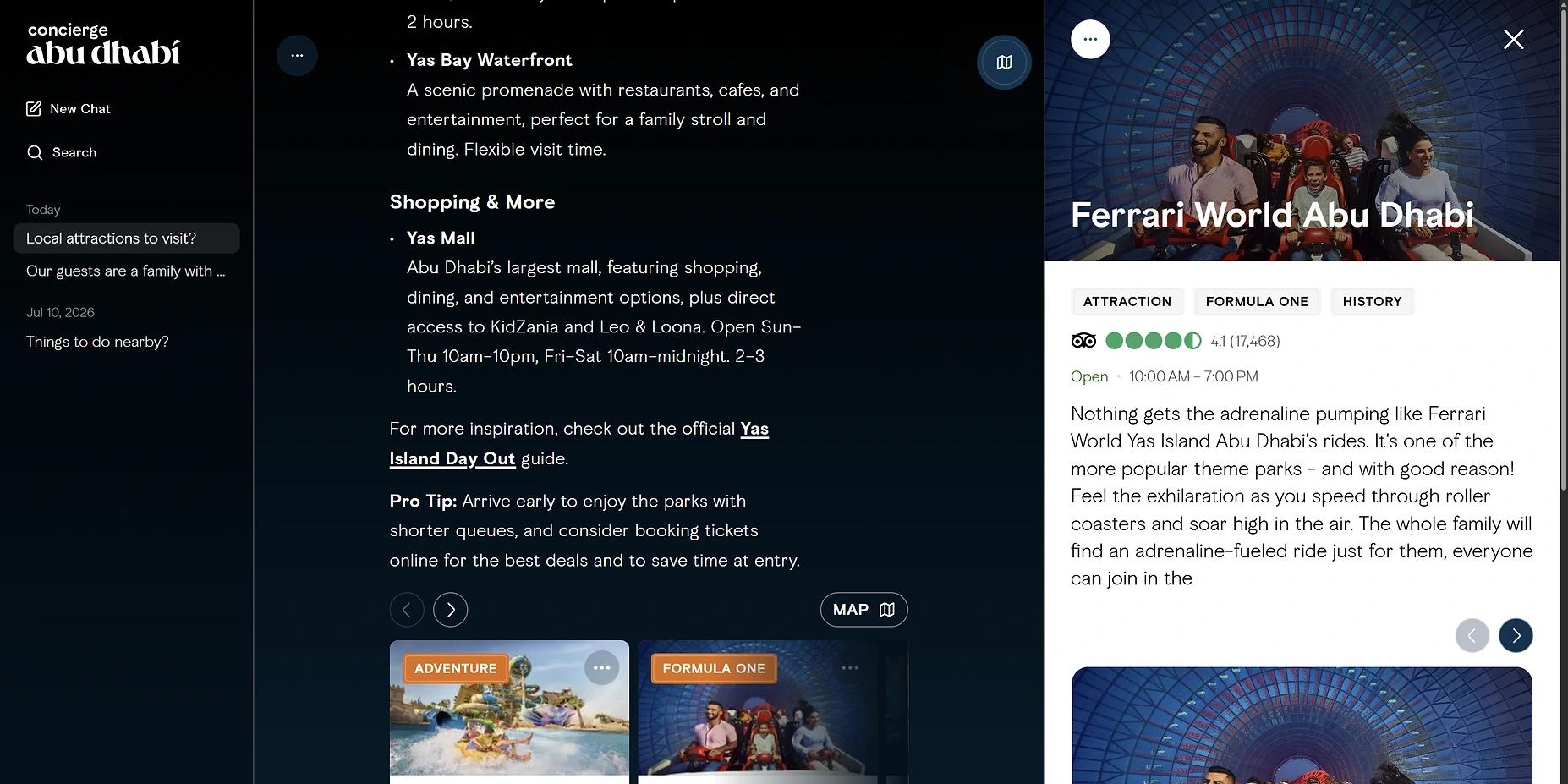
Attraction cards with TripAdvisor ratings and review counts, and a side panel with a photo gallery, tags, today's opening hours, a description and a Book Now link.
04
Maps
A split-screen Mapbox map for every answer, with clustered pins, landmark icons, category filters, full-screen mode and a card strip that stays in sync with the chat.
05
Live distances from the desk
The workstation asks the browser for permission to use its location. Once it is granted, the agent calls a maps API and works out the distance from the desk to each place or event it suggests, at the moment of the answer.
06
Itinerary builder and editor
A guided Create Itinerary flow with an Interests or Manual mode for hand-picking venues by type, an itinerary card in the chat, a side panel with overview and day tabs and a map, and a drag-and-drop editor to reorder, remove or add stops.
07
Guest hand-off
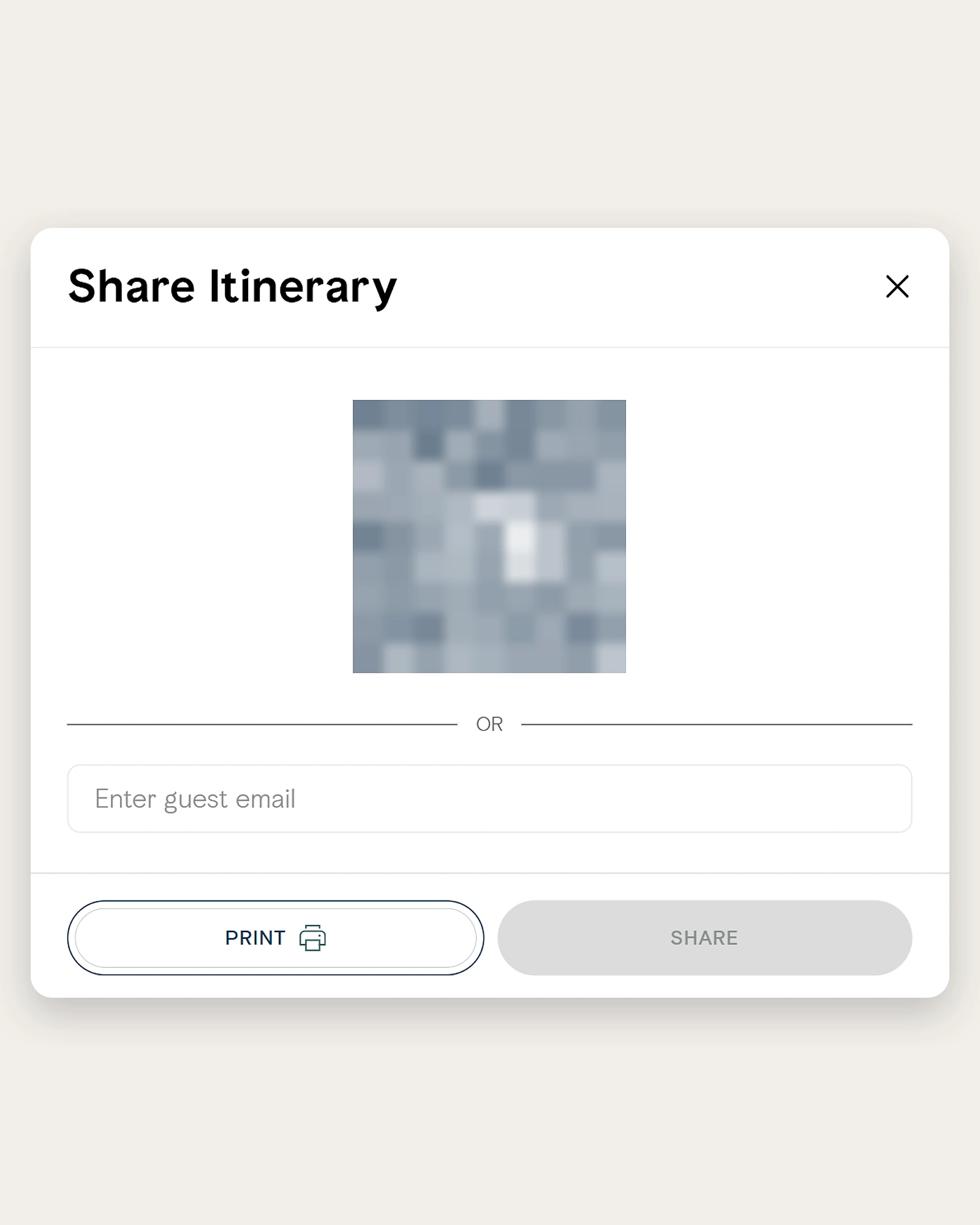
A Share Itinerary dialog with a branded QR code, an email field with validation and a print layout, plus a public itinerary page the guest opens on their own phone without signing in.
08
Admin console and analytics
Employees and roles, starter prompts, moderation responses, conversation and booking feedback with CSV export, token and cost statistics, and 65 Google Tag Manager events.
What the desk can do with it
These are real screens from the live concierge, captured while planning for example guests, and what each one does for the person at the desk.
01
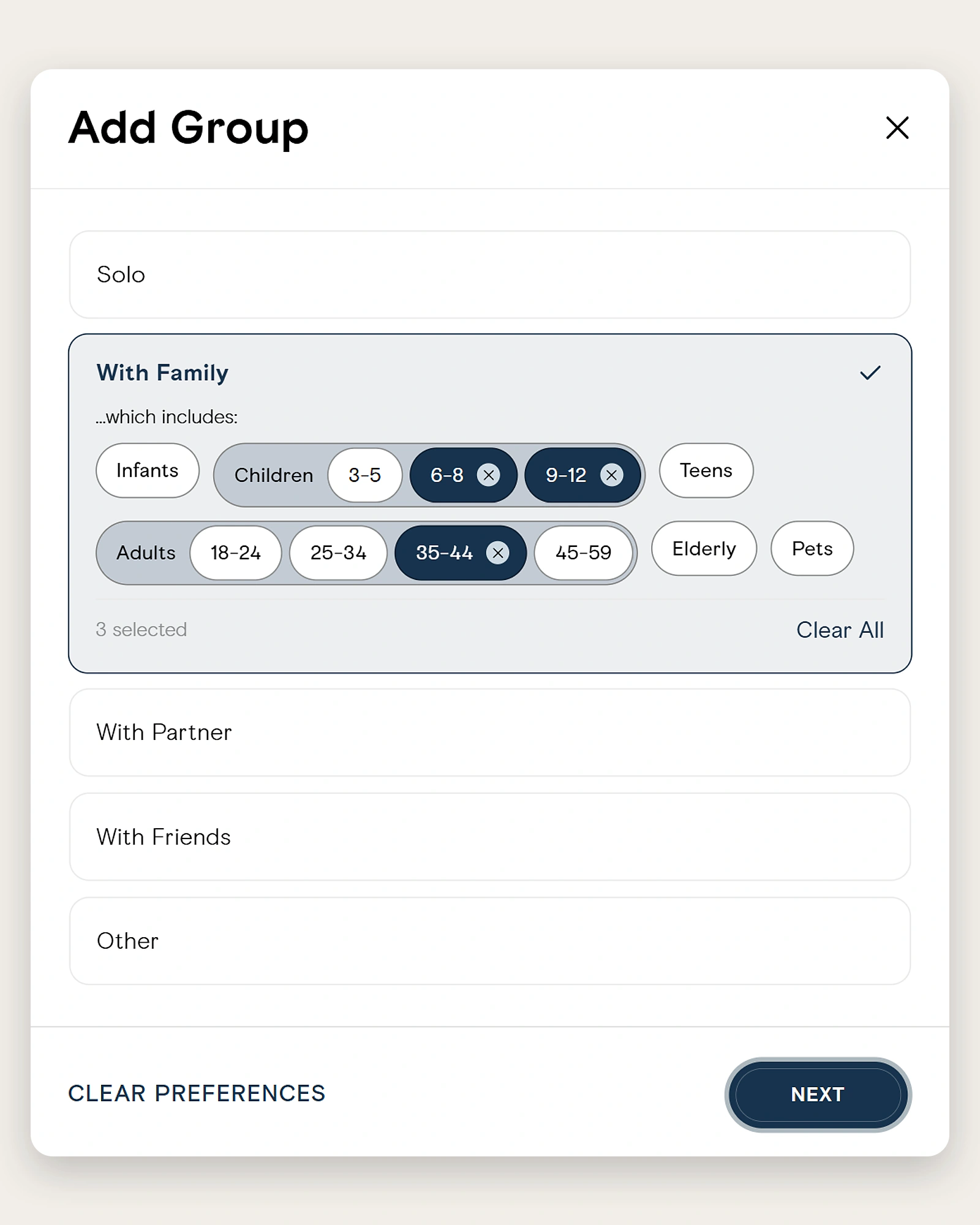
A Guest's Party, Captured in Seconds
The brief starts with who is traveling. Choosing With Family opens age bands for children, teens and adults, plus infants, elderly guests and pets, so "two kids aged 7 and 10 with their parents" becomes three taps. The bands travel with the request, so suggestions fit the actual ages in the party.
02
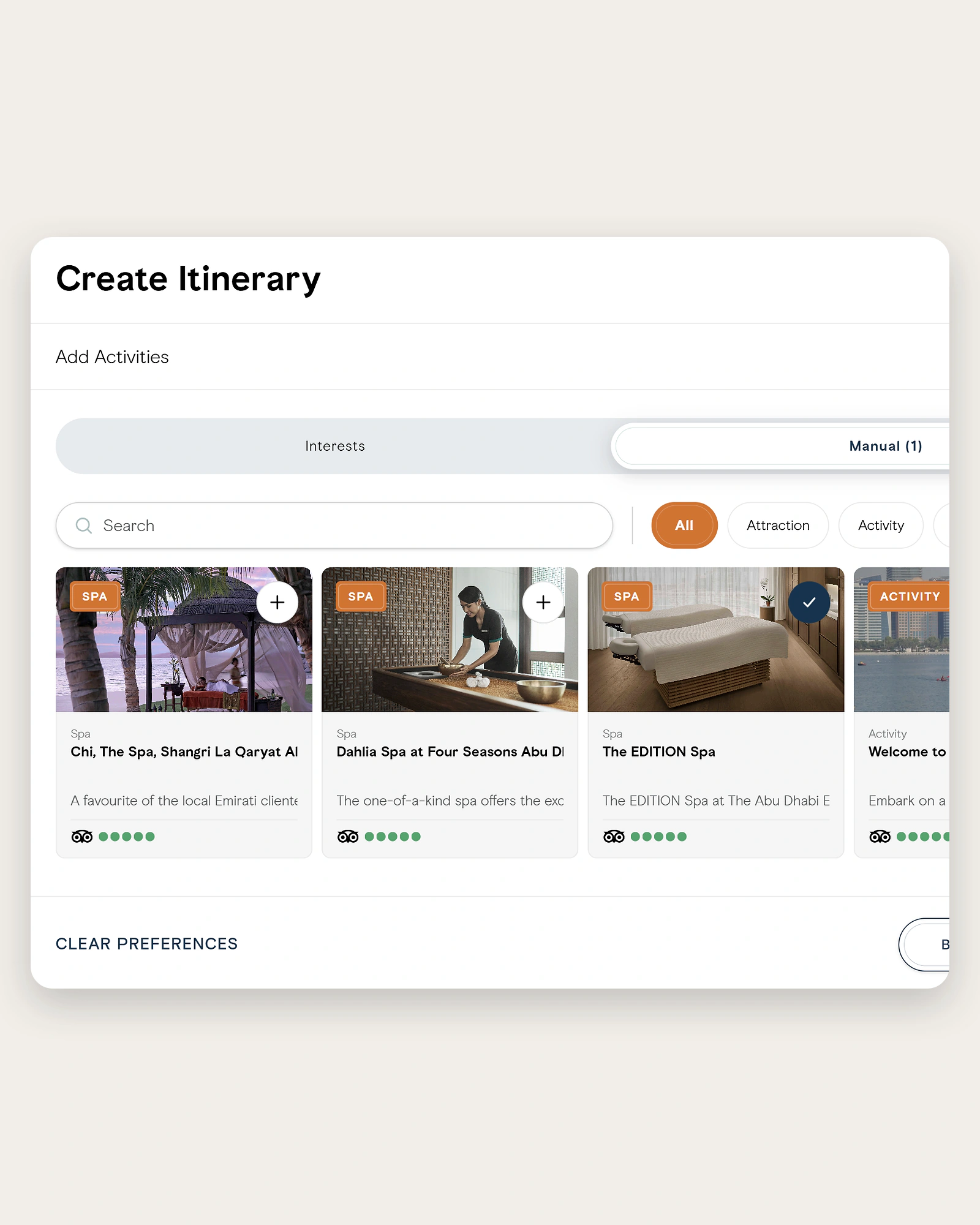
The Place the Guest Already Has in Mind
Guests often arrive with one name already on their list. Manual mode lets the concierge search the official listings by type, from attractions and dining to events and spas, and tick the exact venue. The pick is written into the request, so the plan is built around it.
03
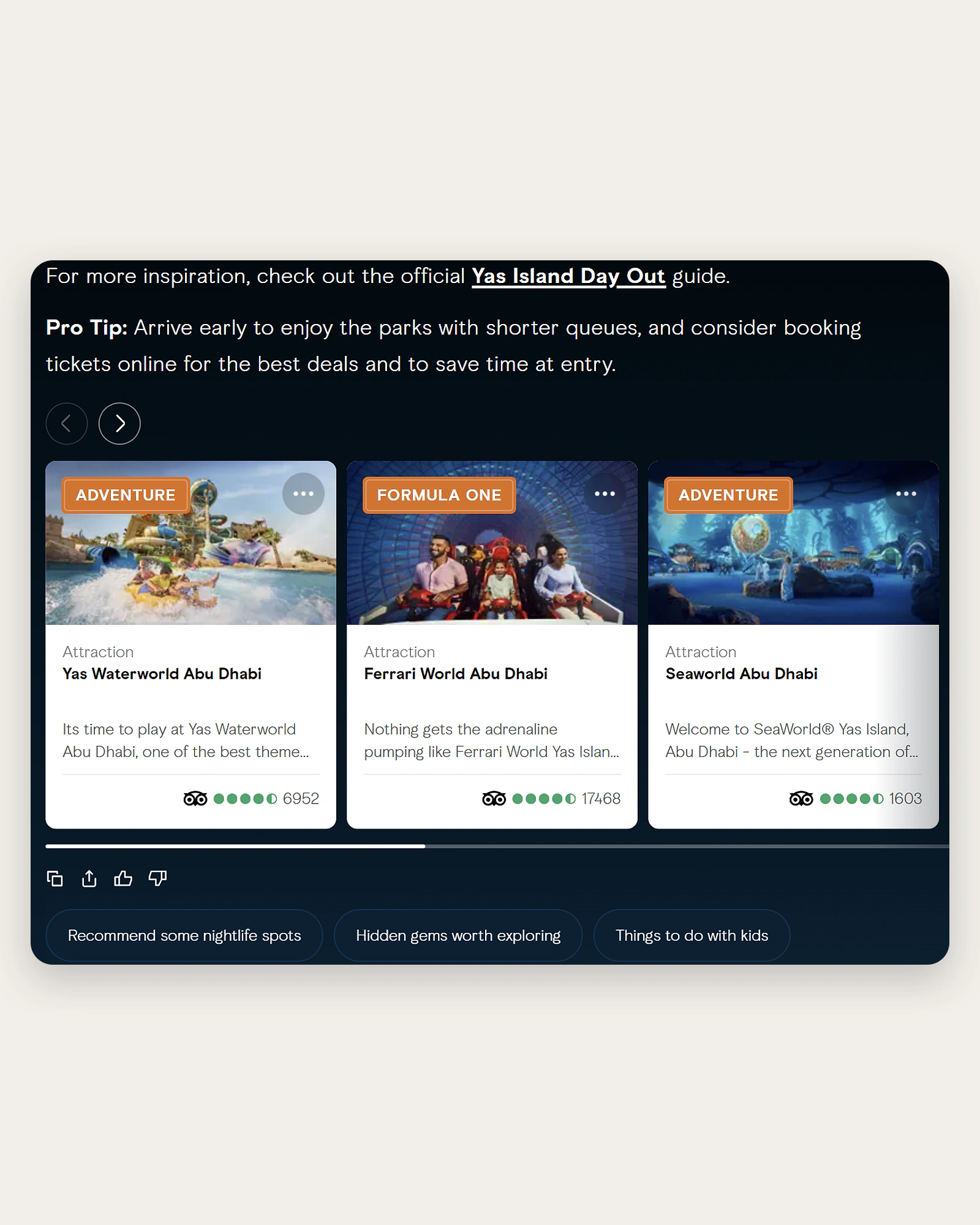
Answers the Guest Can See Across the Desk
A question about a family day on Yas Island comes back with real venues, hours and suggested visit lengths, a tip from the concierge, and cards with photos and TripAdvisor ratings that the staff member can turn the screen to show. Follow-up chips keep the conversation moving without retyping.
04
Opening Hours Before the Guest Asks
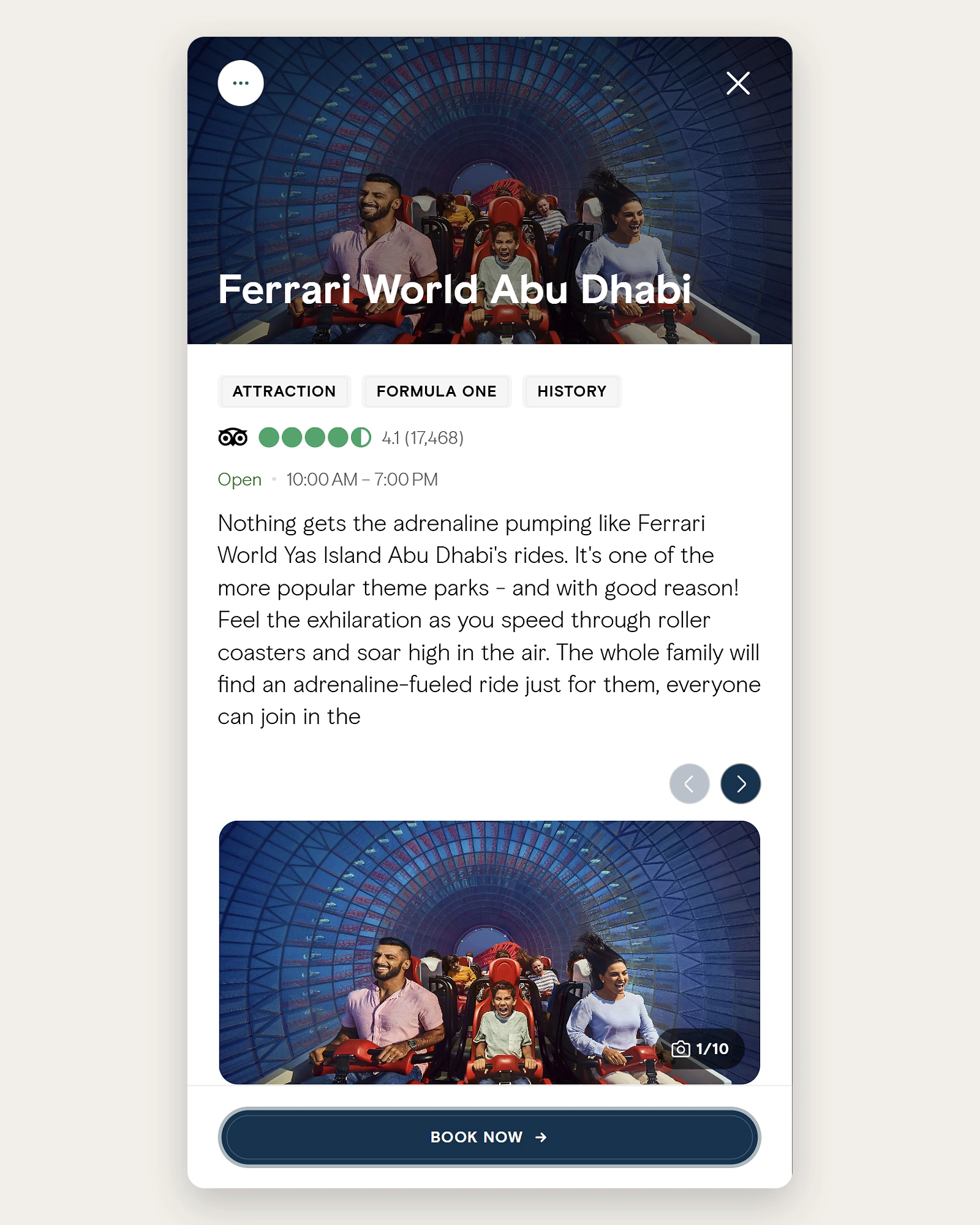
Opening a card shows the venue in a side panel: tags, the rating and review count, whether it is open now and today's hours, a description, a gallery and a Book Now link. The answer to "is it open?" is on screen before the guest asks.
05
Every Answer on a Map
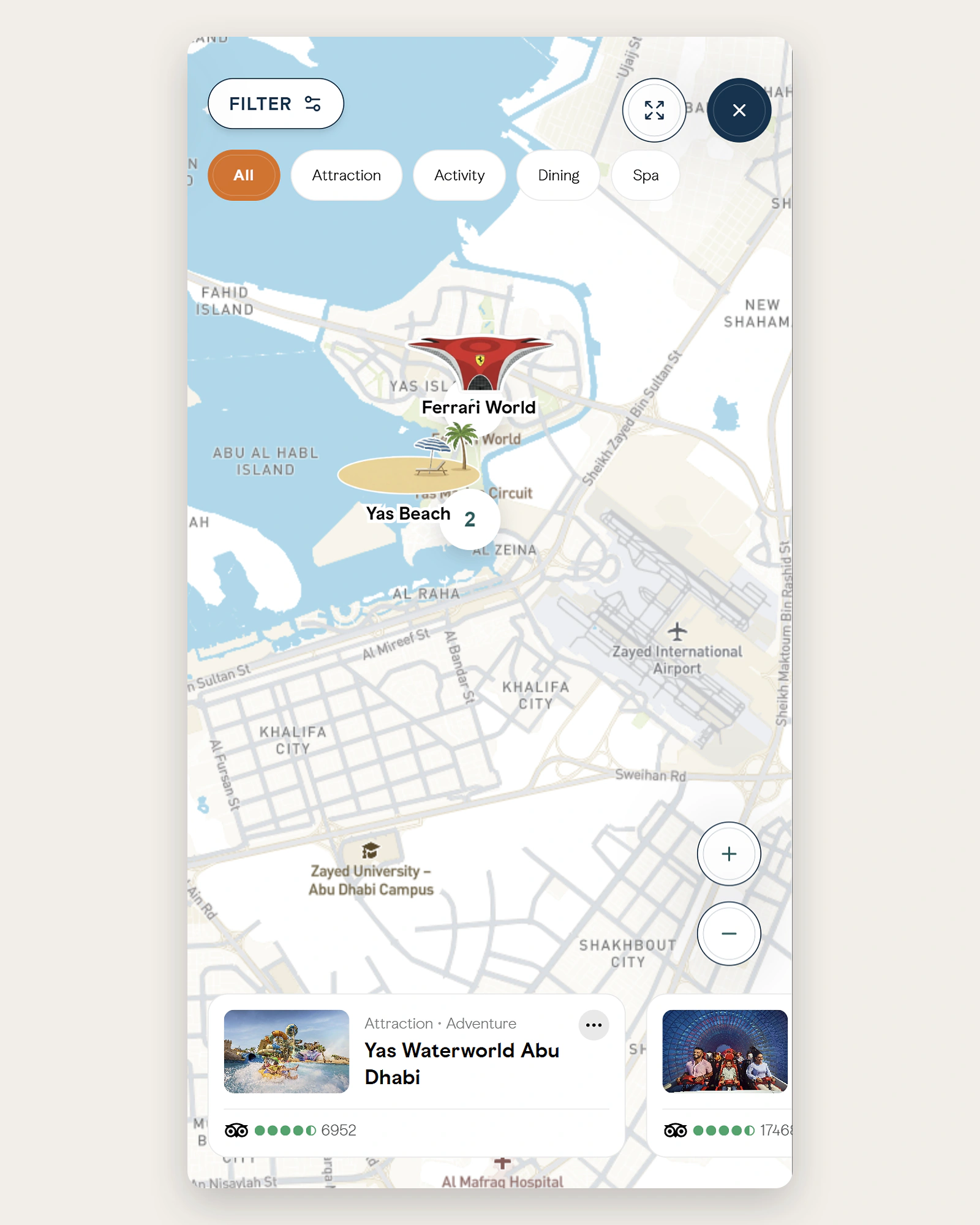
The map opens beside the chat with each suggestion as a landmark icon or a pin, grouped into a numbered cluster when stops sit close together, with category filters, full-screen mode and a card strip along the bottom. It answers the second question every guest asks: how far is it?
06
A Plan, Not a Paragraph
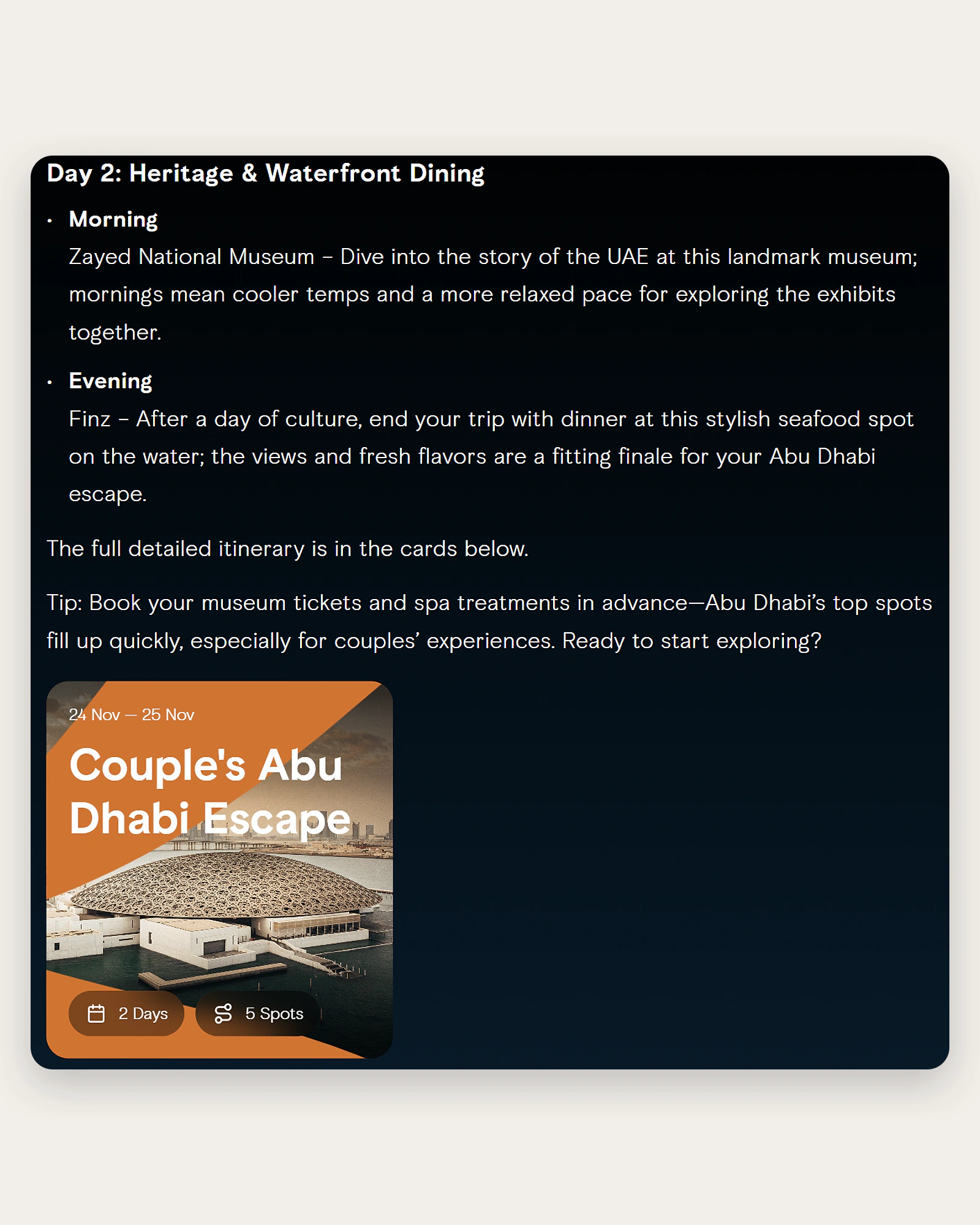
Create Itinerary turns the brief into a structured plan shown as a card in the chat, with the dates, the number of days and the number of stops, alongside a readable day-by-day summary. Opening the card shows the plan with an overview, a tab for each day and a map.
07
Adjusted While the Guest Watches
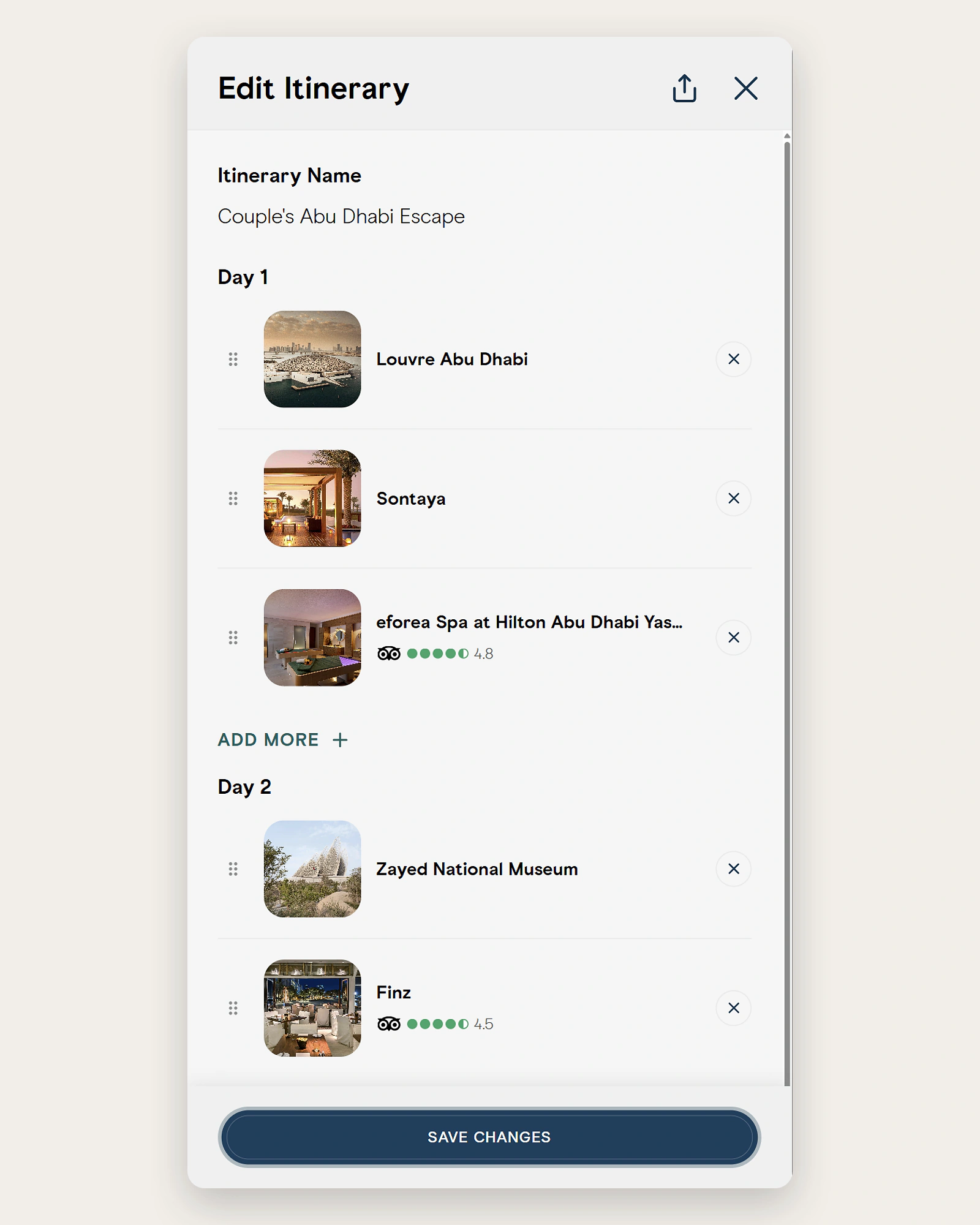
Plans change at the desk. The editor lists every stop by day with drag handles, so the concierge can reorder the day, remove a stop or add more from the listings, then save. The guest gets the version they agreed to, not the first draft.
08
The Plan Leaves With the Guest
Share Itinerary hands the plan over in whichever way suits the guest: a branded QR code that opens it on their phone, an email with validation, or a printout. The QR code is obscured in this screenshot.
The stack behind it
Next.js 16, React 19, TypeScript, Tailwind CSS 4, Redux Toolkit, TanStack Query, Mapbox GL, supercluster, dnd-kit, qr-code-styling, Recharts, Zod, Azure AD B2C, Google Tag Manager, Docker, Azure Pipelines
Frontend
Next.js 16 with the App Router and Turbopack, React 19 and TypeScript, Tailwind CSS 4 and a custom component set, Markdown rendering for answers
State and data
Redux Toolkit with persisted session state, TanStack Query 5 with its cache persisted to IndexedDB, Zod validation and streaming responses with a stop control
Maps and itineraries
Mapbox GL through react-map-gl with supercluster pin clustering, dnd-kit drag and drop for the itinerary editor and qr-code-styling for branded QR codes
Identity and security
Azure AD B2C sign-in with admin and concierge roles, a one-time code per login, tokens in cookies page scripts cannot read and a server proxy that refreshes sessions silently
Admin and analytics
Admin console with Recharts usage and cost charts, feedback and booking feedback with CSV export, and 65 named Google Tag Manager events
Delivery
Docker images on Node 24 built by Azure Pipelines, with framework and dependency security upgrades shipped as they are released
Our development process
Months 1 to 3
Foundations
From November 2025 we built the Next.js workstation, Azure AD B2C sign-in with roles, streaming chat, venue cards and the map, and shipped Phase 1 in February 2026.
Months 4 to 5
Phase 2
The guided itinerary builder with group age bands, dates, interests and accessibility needs, Manual venue picks, the drag-and-drop editor and the QR, email and print hand-off went live in April 2026.
Months 6 to 9
Operations
The admin console gained employees, starter and moderation prompts, booking feedback and token and cost statistics, alongside analytics events across the app and security hardening after an independent review.
Month 11 onward
Framework and dependency security upgrades, including the move to Next.js 16.4.1 in October 2026.
Transparency
Every figure on this page comes from the application's code and history. The client has not published usage numbers for the concierge, so none are quoted here.
After launch
The screenshots were taken in the live application while planning for example guests. Shared QR codes are obscured.
What changed after launch
From Question to Take-Away Plan at the Desk
The whole loop happens in one screen: capture the guest's party, dates and interests, answer with real venues, build and adjust the itinerary, then hand it over by QR code, email or printout. The guest leaves with the plan on their phone or on paper, not a list of names to search later.
How Far Is It, Answered From the Desk
The workstation requests its location through the browser's permission prompt. When staff allow it, the agent calls a maps API and returns how far each suggested venue or event is from the desk where the guest is standing, calculated live for every answer, so the concierge can tell a guest what is close enough for the time they have.
Plans That Fit the Actual Party
Group profiles go down to age bands for children and adults, plus infants, elderly guests and pets, and accessibility needs cover motor, cognitive, visual, hearing and speech. Staff record what matters in a few taps instead of typing it into every request.
The Guest's Own Picks, Guaranteed a Place
Manual mode lets the concierge search the official listings and tick the spa, restaurant or attraction the guest already wants, and the request names it explicitly. The itinerary is built around the guest's choice instead of replacing it.
Run by the Client's Team, Not by Releases
Admins manage employees, roles and the six starter prompts staff see first, set moderation responses, review conversation and booking feedback with CSV export, and watch token and cost statistics, all from the console.
Every Desk Action Measured
65 named analytics events cover sign-in, messages, stopped answers, feedback, copies and shares, outbound and booking clicks, history search, itinerary creation, sharing by email and printing, so the team can see which features staff actually use.
Safe on a Shared Desk Computer
Sign-in goes through Azure AD B2C with a one-time code per login to stop replayed tokens, session tokens live in cookies that page scripts cannot read, and a server proxy refreshes sessions without exposing them. The application was hardened further after an independent security review.
A concierge desk is a moment, not a browsing session. The guest is standing there, the queue is behind them, and the plan has to leave with them. Concierge Abu Dhabi was built around that moment: a guest brief captured in taps, answers made of real venues with hours, ratings and a map, an itinerary the concierge can shape while the guest watches, and a hand-off by QR code, email or print. Behind it, an admin console lets the client's team steer the tool and measure how it is used.
Go deeper on this build
- IndustryAI for Travel, Tourism and HospitalityWhat we build for tourism boards, destination marketing organizations and hotels.
- ServiceAI Chatbot DevelopmentChatbots that answer from your own content and hand off when they should.
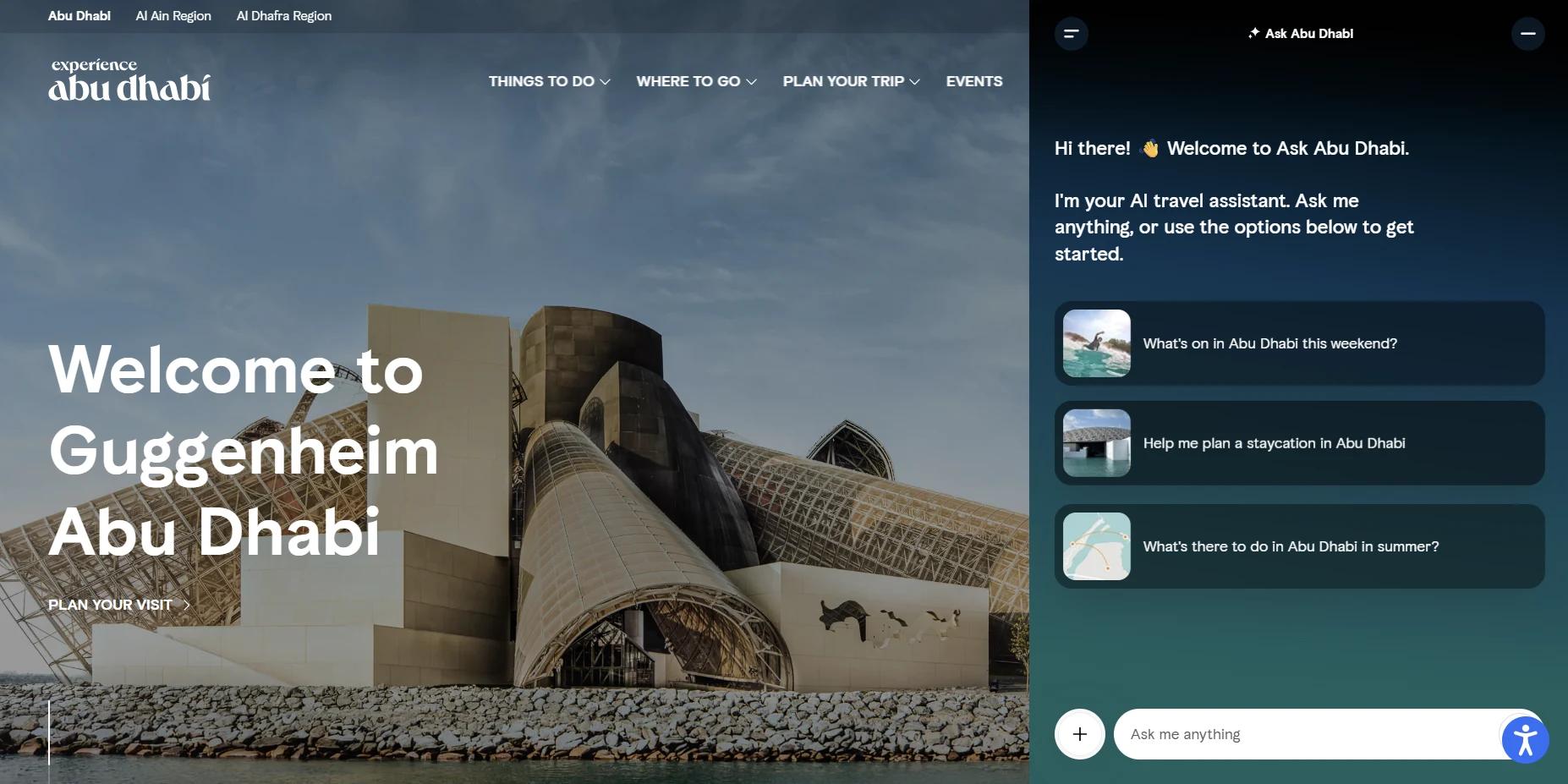
- Case studyAsk Abu Dhabi case studyThe visitor-facing AI concierge on Abu Dhabi's official tourism site.
More EdgeFirm case studies



Get AI live in months, not years.
Book a 30-minute strategy call with the founders who will write your code.