How to Build an AI Knowledge Base for Your Company
What to index, how to handle permissions and retrieval, plus real cost and timeline ranges.

Co-Founder & Director of Engineering
· 5 min read

On this page · 10 sections
- 01What an AI knowledge base really is
- 02Step one: decide what goes in
- 03Step two: sort out permissions first
- 04Step three: get the retrieval right
- 05Step four: measure before you launch
- 06What it costs and how long it takes
- 07Should you just buy a tool?
- 08Where these projects go wrong
- 09Adoption is the real test
- 10Discuss your AI knowledge base
Every company already has an AI knowledge base problem, even without the AI. The knowledge is there. It is just spread across Confluence, SharePoint, a shared drive, forty Slack threads, and the head of one person who joined in 2017.
Search alone does not fix that. What does help is a system where you can ask a plain question. You type it, and you get a sourced answer in seconds rather than an afternoon.
Here is what building one actually involves, and where these projects usually go wrong.
What an AI knowledge base really is
The term gets used loosely, so it helps to be precise.
You are not training a model on your files. That idea was popular in 2023. It is rarely the right call now. Fine-tuning bakes the content into the model, so updates are slow and sources are lost.
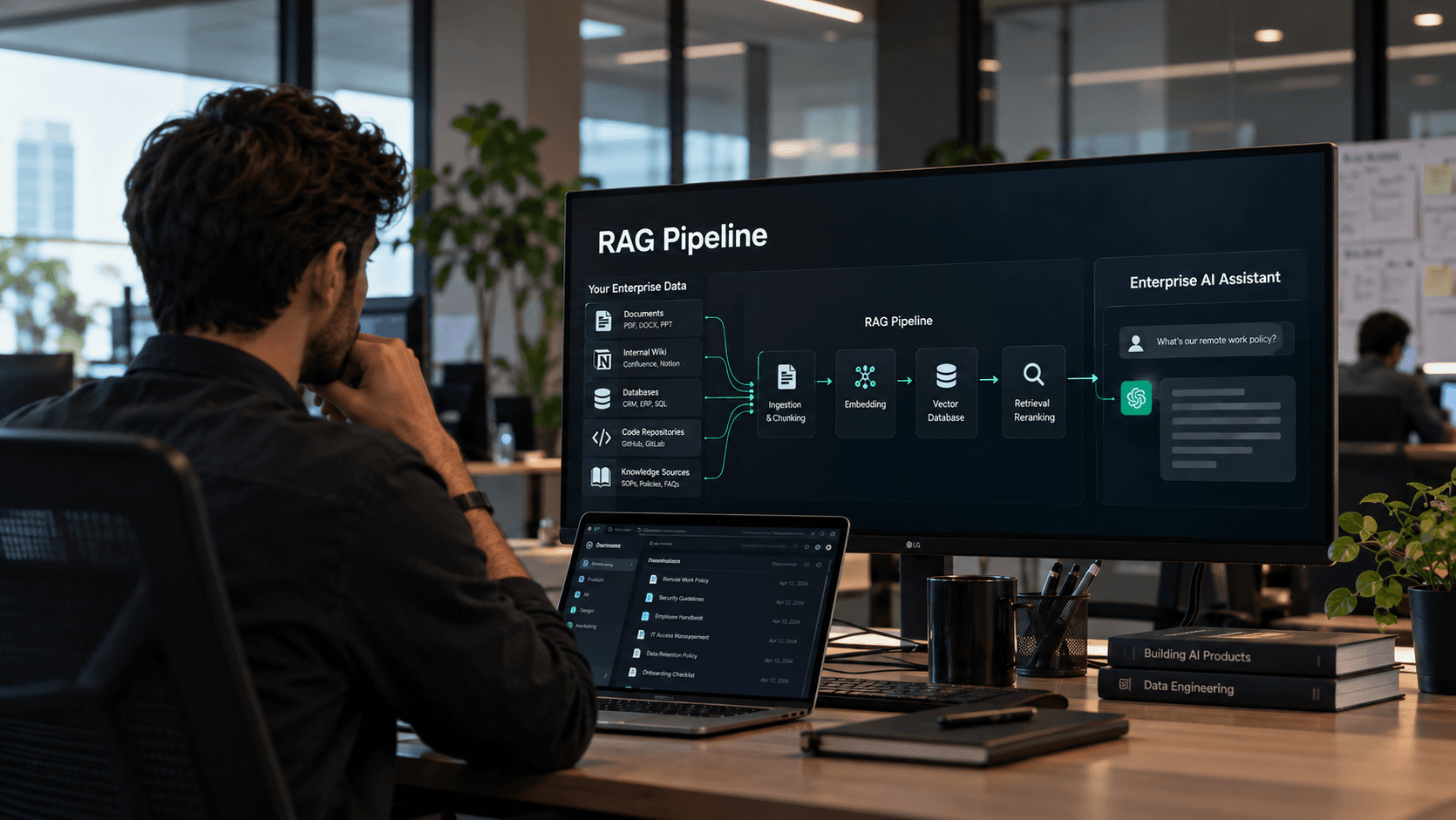
Instead, a modern AI knowledge base uses retrieval. Your content stays where it is. Someone asks a question. The system finds the passages that match, hands them to a model, and the model answers from that text alone. Each answer cites its source, so a reader can check it.
That design matters in business terms. Edit a document and the answers change with it. Nobody retrains a thing.
Step one: decide what goes in
This is where most projects should start, and where most of them rush.
Pick a small set of content people really ask about. Policies work well. So do product docs, standard procedures, contracts, and past support tickets. Resist the urge to index everything on day one.
Then face the quality problem. Most firms hold three versions of the same policy. Two are out of date. The system will quote all three with equal confidence, which is worse than useless. So someone has to pick the right one before you index anything.
Ownership matters here too. Every source needs a named owner who is responsible for keeping it current.
Step two: sort out permissions first
This is the detail that sinks projects late, and it deserves attention in week one.
Your HR folder is not open to everyone. Nor is the legal drive, or the salary file. Search across all of it and answer anyone who asks, and you have built a very efficient leak.
So the rules have to apply at search time, per user. Filtering later is too late. Ask any vendor how they do this. A vague answer is a bad sign, because adding access control to a finished system is slow and costly.
Step three: get the retrieval right
Search quality decides whether people trust the thing. It also separates a weekend demo from a system that survives real users.
How you split documents matters more than teams expect. Split them badly and you get fragments with no context. The model then answers with confidence, from half a sentence. Tables, headers, and nested clauses all need care.
Tags matter as much. Mark each file with a type, a date, a team, and a version. The system can then prefer this year's policy over the 2019 one. Without tags, it cannot tell them apart.
Hybrid search usually beats pure vector search at work. Keyword matching catches product codes, acronyms, and part numbers that vectors tend to blur.
Step four: measure before you launch
Write fifty real questions with known correct answers before the build finishes. Use them as your test set.
Then track two things after launch. Did it find the right passage? Did it use that passage well? Those fail in different ways, and mixing them hides the real problem.
McKinsey's State of AI research found that most firms now use AI somewhere. Only a small share can point to a real effect on earnings. Weak measurement is a big part of that gap.
What it costs and how long it takes
A focused AI knowledge base over one content set, with one or two integrations, runs three to four months at $40,000 to $60,000.
Wider rollouts cost more. Several sources, access rules across systems, and Slack or Teams delivery sit in the $70,000 to $100,000 range over four to five months. Most of our custom LLM and RAG work lands there.
Add inference on top, which grows with use. Then add upkeep at 15% to 20% a year. Your content keeps changing, and search has to keep up.
Should you just buy a tool?
Sometimes, yes. Several vendors now sell an AI knowledge base as a product, and they connect to the usual sources out of the box.
Buy when your content sits in common systems, your access rules are simple, and you can live with their answer format. In that case you will be running in weeks, not months.
Build when the opposite is true. Unusual sources, strict access rules, an odd document format, or a need to embed answers inside your own product all point to a custom build. Owning the code also matters if this becomes core to how your teams work.
Most companies we talk to start by pricing both. That is the right instinct.
Where these projects go wrong
Four failure patterns account for most disappointments.
- Indexing everything. More content lowers precision. A tight, curated corpus beats a comprehensive mess every time.
- Skipping the cleanup. Files that disagree produce answers that disagree. Users lose faith after about three of those.
- No citations. If people cannot verify an answer, they will not rely on it for anything that matters.
- No owner after launch. Content drifts. Accuracy slips. Nine months later the tool has a reputation nobody wants to fix.
Adoption is the real test
A technically sound AI knowledge base that nobody opens returns nothing at all.
Put it where people already work. A Slack or Teams version gets used far more than a portal, because it saves a step. Then seed it with the questions your support or HR team fields most often. Early wins build the habit.
Watch what people ask in month one. It rarely matches what you guessed. It also tells you exactly what to index next. Our 4-Month AI Framework covers this rollout order in more detail.
Discuss your AI knowledge base
The right scope for an AI knowledge base depends on your content, your access rules, and who will use it daily.
Book a 30-minute call with our founders. You will leave with a recommended scope, a timeline, an investment range, and an ROI estimate. No sales pitch.
Topics
- AI knowledge base
- RAG
- Enterprise search
- Custom LLM applications

Written by
Co-Founder & Director of Engineering
Usman brings 8+ years of experience building enterprise systems. He specializes in system architecture, DevOps, and data pipelines that power production AI.
Work with EdgeFirm
Ship this in your stack in 4 to 5 months.
A 30-minute call with the founders who will write your code. Fixed price, full IP ownership, no offshore handoff.
Book Strategy CallOr get the 4-Month Framework